
คนไทยรักบอลไทย: Version one in a day. Nine versions in a month.เวอร์ชันแรกใน 1 วัน 9 เวอร์ชันใน 1 เดือน
A web app for a fundraising campaign for Thai football: back the team by buying the supporter shirt, a match ticket, or by donating. Two of us designed it against the clock: the first version in one day, nine versions in a month, on mobile, desktop and a check-in screen for staff.เว็บแอปของแคมเปญระดมทุนเพื่อฟุตบอลไทย ร่วมสนับสนุนด้วยการซื้อเสื้อเชียร์ บัตรเข้าชม หรือบริจาค เราออกแบบกัน 2 คนแบบแข่งกับเวลา เวอร์ชันแรกเสร็จใน 1 วัน และทำไป 9 เวอร์ชันใน 1 เดือน ทั้งมือถือ เดสก์ท็อป และหน้าจอให้เจ้าหน้าที่ตรวจคนเข้างาน
Fundraising campaign web appเว็บแอปแคมเปญระดมทุน · 7 Solutions · 2025 · Not launchedไม่ได้เปิดใช้งาน
- Toolsเครื่องมือ
- Screensหน้าจอที่ออกแบบ
- Mobile web
- Desktop web
- Staff check-in
How I workedผมทำงานยังไง
Who did what, step by step. The highlighted lane is mine.ใครทำอะไร ในแต่ละขั้น เลนที่ไฮไลต์คือส่วนของผม
Who did what, a step a card: swipe through. The highlighted rows are mine.ใครทำอะไร ขั้นละการ์ด ปัดดูได้ แถวที่ไฮไลต์คือส่วนของผม
01UX
- UX/UI leadหัวหน้าทีม UX/UIWorking alongsideทำงานร่วมกันSteps 01 to 02ขั้น 01 ถึง 02
- MeผมThe UX thought through as I wentคิด UX ไปพร้อมกับระหว่างทำ
02UI
- MeผมMobile, desktop and the staff's page, in one dayมือถือ เดสก์ท็อป และหน้าเจ้าหน้าที่ ใน 1 วัน
The whole pictureภาพรวมงานทั้งหมด
Everything I did on this project, one row each. Tap a row for the detail.ทุกอย่างที่ผมทำในโปรเจกต์นี้ แถวละเรื่อง กดเพื่ออ่านรายละเอียด
Everything I did on this project. Swipe through, tap one for the detail.ทุกอย่างที่ผมทำในโปรเจกต์นี้ ปัดดูทีละเรื่อง แตะเพื่ออ่านรายละเอียด
- Version one in a dayเวอร์ชันแรกใน 1 วันProblemปัญหาThe brief came in, and the first version was due the next dayได้ requirement มา และต้องส่งเวอร์ชันแรกในวันถัดไปWhat I didสิ่งที่ทำMobile, desktop and a staff check-in screen in one day; UX worked out while drawing the UIทำมือถือ เดสก์ท็อป และหน้าเจ้าหน้าที่ตรวจคนเข้างานใน 1 วัน คิด UX ไปพร้อมกับทำ UIResultผลลัพธ์Nine versions in a month as the brief kept changing, each one straight to developers9 เวอร์ชันใน 1 เดือนตาม requirement ที่เปลี่ยนตลอด ส่งให้ทีมพัฒนาทันทีทุกครั้ง
- The campaign pageหน้าแรกProblemปัญหาOne page had to explain the cause and lead into three ways to giveหน้าเดียวต้องเล่าเหตุผลของแคมเปญ และพาไปสู่สามทางสนับสนุนWhat I didสิ่งที่ทำThe cause, a film, the shirt target against shirts sold, then the ways inเหตุผล วิดีโอ เป้าหมายเสื้อเทียบยอดที่ขายได้ แล้วจึงทางเข้าResultผลลัพธ์Fans see the goal and how far it has come before they chooseแฟนบอลเห็นเป้าหมายและความคืบหน้าก่อนเลือก
- Buying a ticketหน้าซื้อบัตรProblemปัญหาThree match dates, two kinds of ticket, one decisionสามวันแข่ง บัตรสองแบบ ในการตัดสินใจครั้งเดียวWhat I didสิ่งที่ทำPrices stated once at the top; each match a poster with one buttonบอกราคาครั้งเดียวด้านบน แต่ละนัดเป็นโปสเตอร์ที่มีปุ่มเดียวResultผลลัพธ์Pick a date, tap Buyเลือกวัน แล้วกดซื้อ
- Doneหน้าสำเร็จProblemปัญหาAfter paying, people need to know it worked and what comes nextหลังจ่ายเงิน คนต้องรู้ว่าสำเร็จ และต้องทำอะไรต่อWhat I didสิ่งที่ทำA clear tick, the order number, a thank-you, and two next stepsเครื่องหมายถูกชัดๆ เลขคำสั่งซื้อ คำขอบคุณ และสองทางไปต่อResultผลลัพธ์See my tickets, or back to the startดูบัตรของฉัน หรือกลับหน้าแรก
- Redeeming the ticket at the gateหน้ากรอกรหัส เพื่อแลกรับบัตรเข้างานProblemปัญหาA ticket bought online still has to become entry on the dayบัตรที่ซื้อออนไลน์ ยังต้องแลกเป็นสิทธิเข้างานในวันจริงWhat I didสิ่งที่ทำA page with one field: the 7-character ticket code, and Checkหน้าที่มีช่องเดียว คือรหัสบัตร 7 หลัก และปุ่มตรวจสอบResultผลลัพธ์The code is confirmed, or told why not: used, or wrongรหัสยืนยันสำเร็จ หรือบอกเหตุผลว่าใช้ไปแล้ว หรือไม่ถูกต้อง
Part 1ตอนที่ 1
Version one in a dayเวอร์ชันแรกใน 1 วัน
Contextบริบท
The campaign couldn't start without the site, so there was no time for a usual design process. The first full version, mobile, desktop and the screen staff use to check people in, was due a day after the brief arrived. Then the brief kept changing, and every change meant a new version for the developers to rebuild. Two of us worked it out on the screens themselves: I kept the UI moving and solved the UX as I went.แคมเปญเริ่มไม่ได้ถ้ายังไม่มีเว็บ จึงไม่มีเวลาทำตามกระบวนการปกติ เวอร์ชันแรกที่ครบทั้งมือถือ เดสก์ท็อป และหน้าจอที่เจ้าหน้าที่ใช้ตรวจคนเข้างาน ต้องเสร็จภายในวันถัดจากที่ได้ requirement จากนั้น requirement ก็เปลี่ยนตลอด ทุกครั้งที่เปลี่ยนคือเวอร์ชันใหม่ที่ทีมพัฒนาต้องทำตาม เราทำกัน 2 คนโดยคิดบนหน้าจอเลย ผมดูแลให้ UI เดินไปข้างหน้า และแก้โจทย์ UX ไประหว่างทาง
- 1
day to the first full versionวัน ได้เวอร์ชันแรกครบ
- 9
versions in one monthเวอร์ชันใน 1 เดือน
- 2
designersคนในทีมดีไซน์
- 1
Part 2ตอนที่ 2
The campaign pageหน้าแรก
Contextบริบท
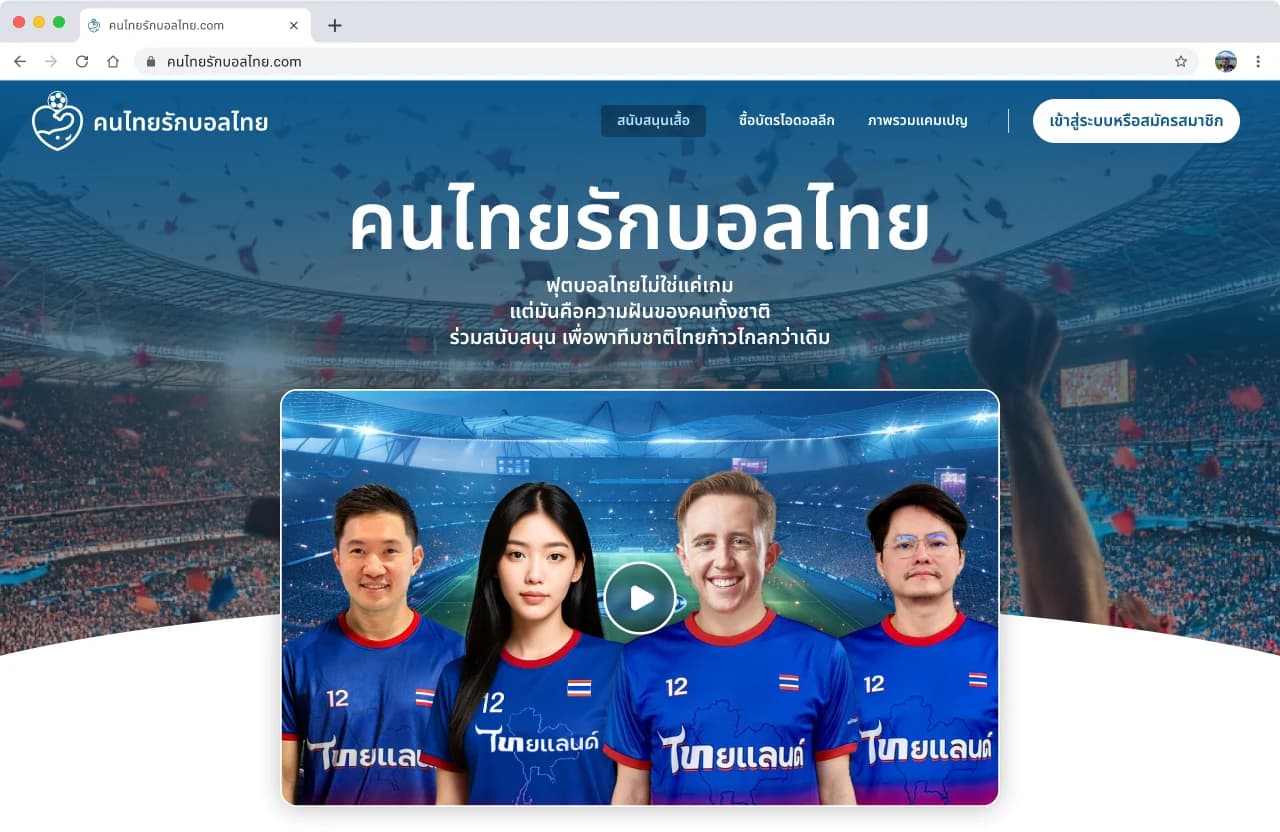
The campaign page leads with the cause and a short film, then the count: the shirt target, shirts sold so far, a runner on the progress bar. Under it, the ways in: the shirt, a ticket, or a ticket with the shirt.หน้าแรกเปิดด้วยเหตุผลของแคมเปญและวิดีโอสั้น ตามด้วยตัวเลข: เป้าหมายเสื้อ ยอดที่ขายได้ และนักวิ่งบนแถบความคืบหน้า ด้านล่างคือทางเข้า ได้แก่ ซื้อเสื้อ ซื้อบัตร หรือซื้อบัตรพร้อมเสื้อ
The screensหน้าจอ
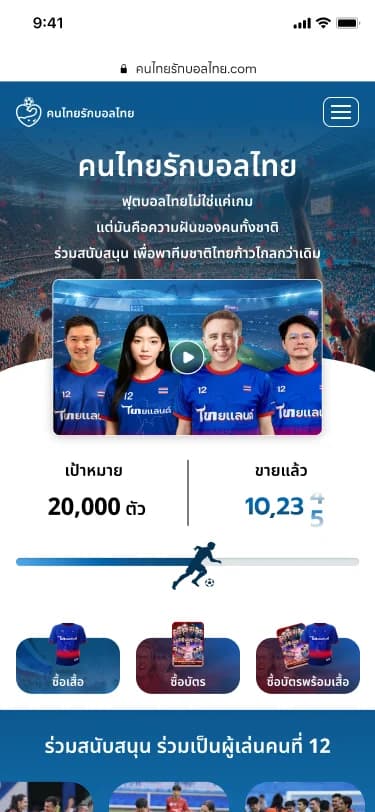
The campaign page on desktopหน้าแรกบนเดสก์ท็อปAnd on a phoneและบนมือถือ
Part 3ตอนที่ 3
Buying a ticketหน้าซื้อบัตร
Contextบริบท
The ticket page states the prices once, a ticket on its own or a ticket with the shirt at a special price, and the venue. Each match date is a poster card with a single Buy button, side by side on desktop and stacked on a phone.หน้าซื้อบัตรบอกราคาครั้งเดียว ทั้งบัตรอย่างเดียวและบัตรพร้อมเสื้อในราคาพิเศษ พร้อมสถานที่ แต่ละวันแข่งเป็นการ์ดโปสเตอร์ที่มีปุ่มซื้อปุ่มเดียว เรียงข้างกันบนเดสก์ท็อป และเรียงลงบนมือถือ
The screensหน้าจอ
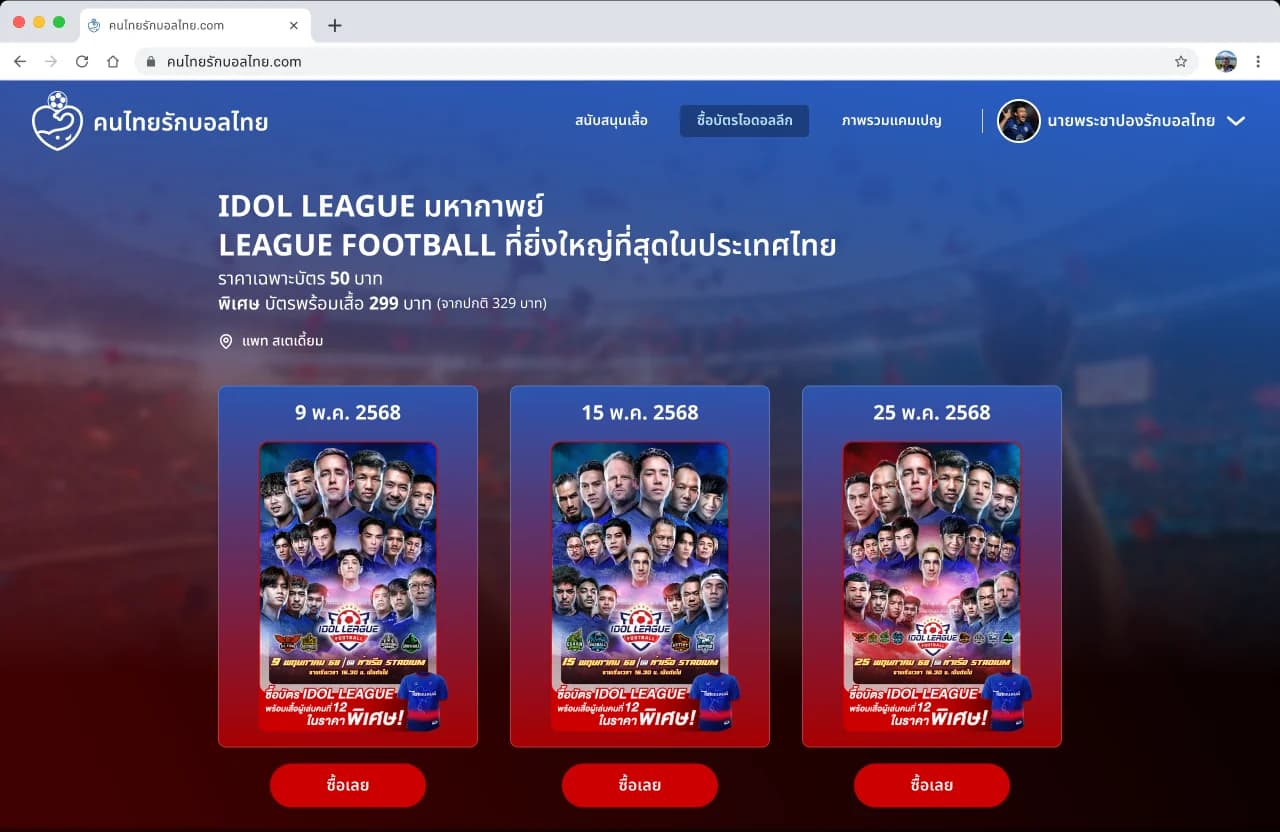
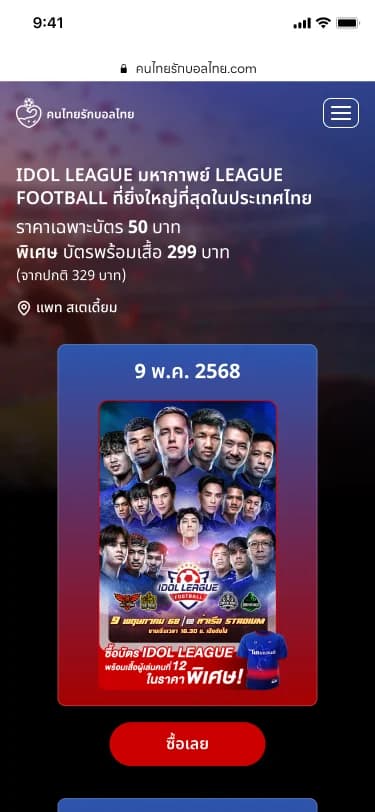
Three match dates as postersสามวันแข่งเป็นโปสเตอร์One poster at a time on a phoneบนมือถือทีละโปสเตอร์
Part 4ตอนที่ 4
Doneหน้าสำเร็จ
Contextบริบท
The order is confirmed with its number and a thank-you for backing the campaign. Two buttons lead on: see my tickets, or back to the home page.ยืนยันคำสั่งซื้อพร้อมหมายเลข และขอบคุณที่ร่วมสนับสนุนแคมเปญ ด้านล่างมีสองปุ่มไปต่อ คือ ดูบัตรของฉัน หรือกลับหน้าแรก
The screensหน้าจอ
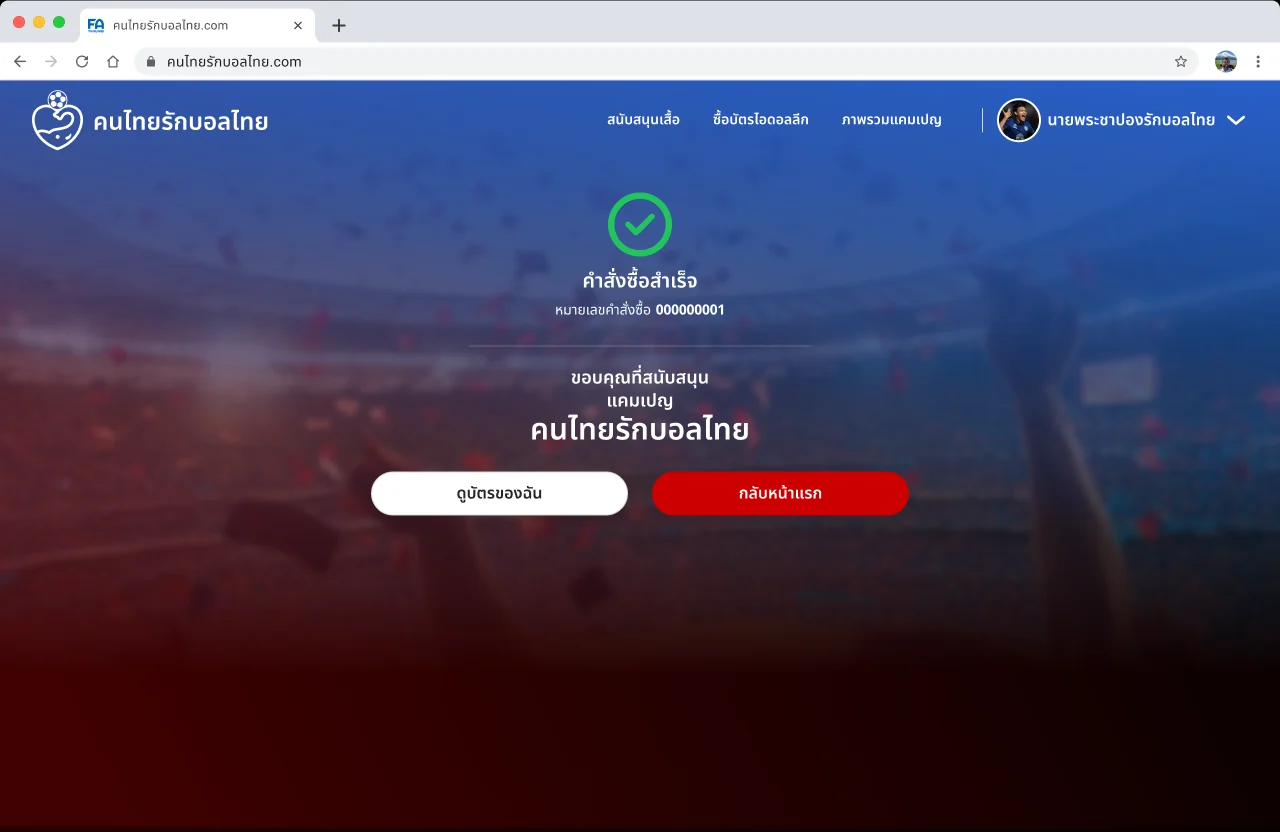
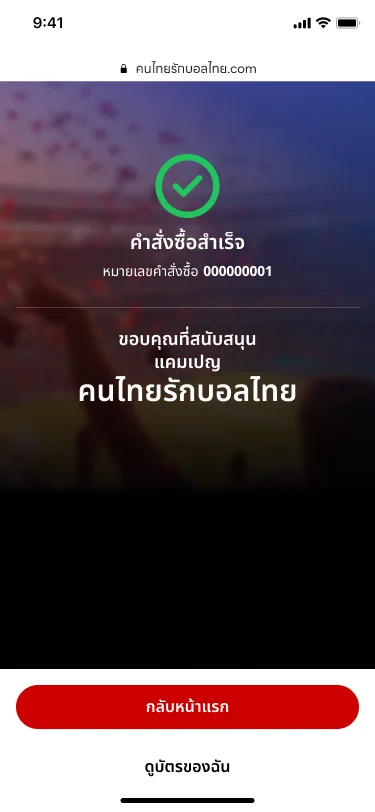
Order confirmed, on desktopคำสั่งซื้อสำเร็จ บนเดสก์ท็อปAnd on a phoneและบนมือถือ
Part 5ตอนที่ 5
Redeeming the ticket at the gateหน้ากรอกรหัส เพื่อแลกรับบัตรเข้างาน
Contextบริบท
To claim entry, the ticket's 7-character code goes into one field and is checked on the spot. Each answer has its own screen: not yet used, already used, or not a valid code.การแลกสิทธิเข้างานใช้รหัสบัตร 7 หลัก กรอกในช่องเดียวแล้วตรวจสอบทันที ทุกผลลัพธ์มีหน้าจอของตัวเอง คือ รหัสยังไม่ถูกใช้งาน รหัสถูกใช้งานแล้ว หรือรหัสไม่ถูกต้อง
The screensหน้าจอ
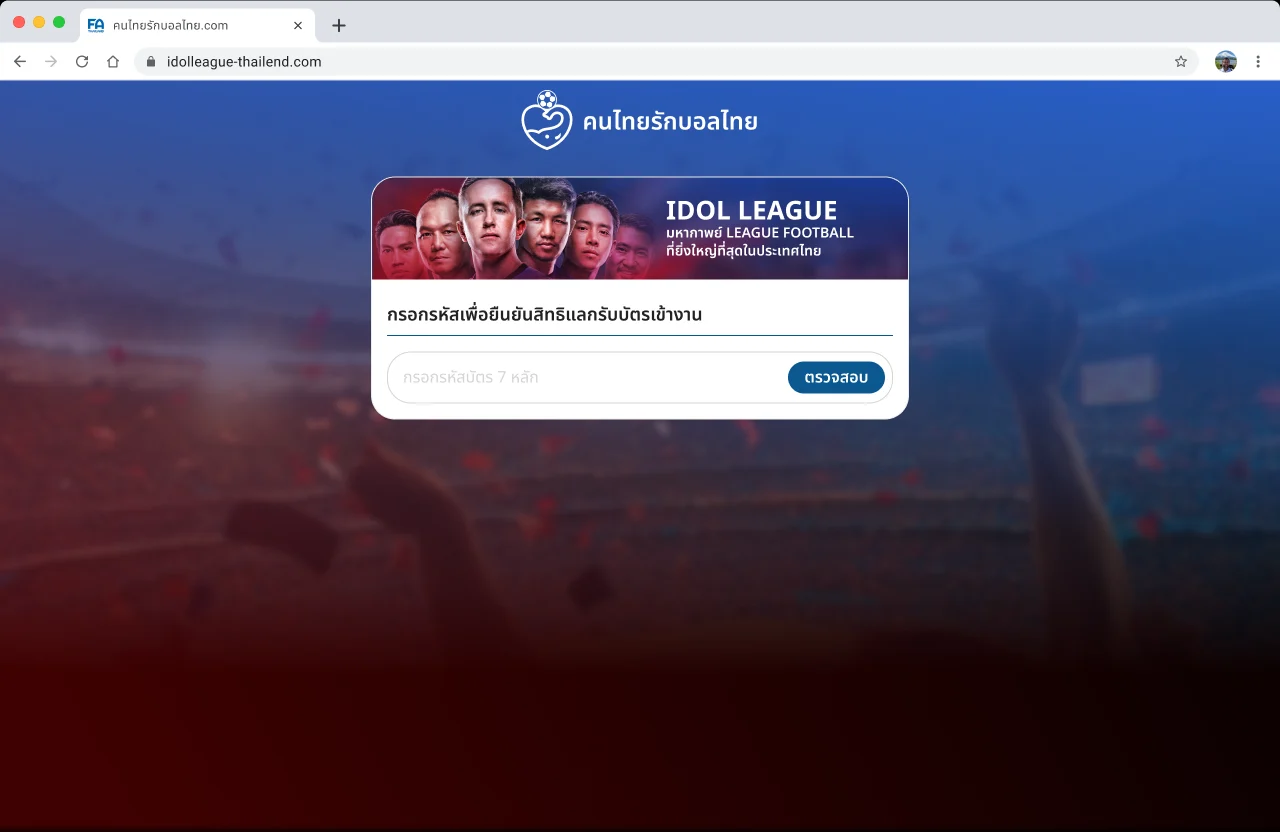

Enter the code to claim entryกรอกรหัสเพื่อยืนยันสิทธิแลกรับบัตรเข้างานThe same on a phoneหน้าเดียวกันบนมือถือ